
Implementing an ERP system often feels overwhelming for small businesses. Long timelines, unclear steps, and technical challenges can delay decisions for months. The reality is much more practical. With a clear roadmap, your business can deploy a fully functioning ERP system in just 21 days.
This guide breaks down a structured three-week plan that helps small and medium businesses move from scattered operations to a unified, automated workflow using ERPNext.
1. Why 21 Days?
For most small businesses, the problem isn’t choosing an ERP. It’s avoiding long, unfocused implementation cycles that slow down operations. The 21-day method solves this by concentrating only on high-impact functions first.
Instead of activating every module at once, the initial rollout focuses on essential business needs that deliver stability from day one.
Core Areas Covered in the First 21 Days
1. Sales and Purchase Workflows
Standardizes quotations, orders, deliveries, and supplier coordination for a clean, traceable order-to-fulfillment cycle.
2. Inventory Accuracy
Keeps stock levels correct across all locations, reducing stockouts and preventing overstocking.
3. Accounting Structure
Ensures every transaction flows directly into your books, making financial reports instant and accurate.
4. Basic Automation
Implements alerts, approvals, and reminders to reduce manual work immediately.
5. User Access and Roles
Creates clear permissions so teams only access the tools they need, improving data integrity and security.
Why This Approach Works
A 21-day implementation keeps the rollout practical and business-focused. Your team starts using the ERP quickly without disruption. Once the foundation is stable, advanced modules—like CRM, payroll, or manufacturing- can be added at your own pace.
This phased approach ensures early results while maintaining full control over future expansions.
2. Week 1: Foundation and Setup
Week 1 establishes the operational backbone of your ERPNext environment. Before activating advanced modules or automations, the system must reflect how your business actually works. This prevents confusion later and ensures every future step builds on a stable, well-configured base.
Day 1–2: Business Process Mapping
Every effective ERP deployment starts with clarity. These first two days focus on documenting how your operations run today and identifying where the system needs to fit in.
The mapping covers:
- How customer orders enter the system and who processes them
- How stock is recorded, updated, and verified
- When invoices are created and approved
- How approvals move from one department to another
- Recurring delays, manual gaps, and error-prone tasks
This step ensures ERPNext follows your real workflow instead of forcing your team to adjust to unfamiliar processes. The result is a system that supports your operations instead of disrupting them.
Day 3–5: System Installation and Configuration
With workflows understood, the next priority is to build a clean technical foundation. These three days focus on setting up ERPNext properly so future modules work without conflicts or data issues.
Core configuration tasks include:
- Installing the latest stable ERPNext release
- Adding company details, tax settings, and the fiscal year
- Creating a chart of accounts that matches your accountant’s structure
- Defining warehouses, locations, units of measure, and essential masters
This structured setup avoids duplicate entries, incorrect records, and system misalignment later in the project.
Day 6–7: User Roles and Permissions
Once the system is ready, each team receives controlled access based on responsibility. This minimizes errors and ensures accountability from day one.
Typical roles include:
- Sales
- Purchase
- Inventory
- Accounts
- Management
Each role is assigned only the permissions required for daily tasks. This protects sensitive data, reduces accidental changes, and gives teams a clear, organized workspace inside the ERP.
3. Week 2: Module Implementation
Week 2 brings the operational modules to life. By the end of this stage, your business has functional workflows for sales, purchases, inventory, and accounting, ready to support daily operations without relying on spreadsheets or manual follow-ups.
Day 8–10: Sales and Purchase Cycle
The sales and purchase cycle forms the core of most SME operations. These three days focus on building smooth, traceable, and automated workflows that reduce manual intervention and improve process discipline.
Key configurations include:
- Quotations: Standardized templates that improve response time and ensure consistent customer communication
- Sales Orders: A defined sequence for confirming and executing customer orders
- Purchase Requests: Clear internal demand tracking that eliminates verbal or unrecorded requests
- Purchase Orders: Structured, accountable communication with suppliers
- Delivery and Receiving: Real-time visibility into outbound and inbound stock movements
Once these workflows are active, the team moves away from spreadsheets and manual coordination, allowing operations to run faster and more reliably.
Day 11–13: Inventory Control
Inventory accuracy has a direct impact on cost, customer satisfaction, and operational efficiency. This phase establishes disciplined, dependable stock management inside ERPNext.
Core setups include:
- Stock entries: Recording all inward, outward, and adjustment movements
- Batch or serial tracking: Essential for industries requiring traceability
- Reorder levels: Automated low-stock alerts for timely replenishment
- Warehouse transfers: Seamless tracking of stock movement across multiple locations
Most SMEs notice immediate improvements here, especially when shifting away from manual logs or disconnected tools.
Day 14: Accounting Integration
Once sales, purchases, and inventory are flowing properly, accounting is integrated to connect every operational activity to your books. This brings financial clarity and real-time reporting to management.
Key activities completed:
- Payment entries: Recording receivables and payables
- Expense tracking: Organized capture of operational spending
- Bank account setup: Ensuring financial transactions align with real-world records
- Opening balances: Ensuring the ERP starts in sync with your existing books
With this integration in place, profitability, cash flow, and financial performance can be monitored without waiting for end-of-month reconciliation.
4. Week 3: Automation, Testing, and Go-Live
The final week focuses on strengthening the system, preparing your team, and transitioning fully from manual processes to ERPNext. By the end of this stage, your business is ready to run daily operations inside a stable, automated environment.
Day 15–17: Automation and Workflows
This phase introduces simple but impactful automations that reduce manual oversight and improve operational consistency. These workflows enhance speed, accuracy, and compliance without adding complexity.
Automations configured include:
- Auto-reorder notifications: Ensures stock levels never fall below safe limits
- Approval flows: Structured authorization for expenses, purchases, and orders
- Email alerts: Timely reminders for overdue invoices, delivery deadlines, and pending tasks
- Follow-up reminders: Keep sales teams consistent with customer communication
These automations help the system operate efficiently even with a lean workforce.
Day 18–19: Data Migration
A smooth go-live depends on clean, accurate data. These two days focus on importing essential records and validating them to ensure reliability from day one.
Data imported includes:
- Customer and supplier lists
- Item masters and product details
- Opening stock across all warehouses
- Outstanding invoices and balances
Proper data migration ensures that day-to-day transactions begin without discrepancies or delays.
Day 20: Team Training
Even the most well-configured system needs informed users. This day is dedicated to short, role-specific training sessions that build confidence and avoid confusion during the transition.
Training covers:
- Sales workflows: Creating quotations, orders, and managing deliveries
- Accounts workflows: Payment entries, invoice tracking, and reconciliations
- Inventory operations: Stock entries, adjustments, and warehouse transfers
Role-based training ensures each team knows exactly what to do on launch day.
Day 21: Launch Day
This is the official switch from manual systems to ERPNext. The goal is stability, not complexity, and the focus is on ensuring the system performs reliably under real conditions.
Key launch activities include:
- Monitoring live transactions to detect issues early
- Fixing minor configuration gaps discovered during real use
- Fine-tuning roles and permissions
- Ensuring teams follow the new workflows consistently
A structured go-live delivers immediate improvements in accuracy, response time, and decision-making clarity.
5. What Your Business Gains in 21 Days
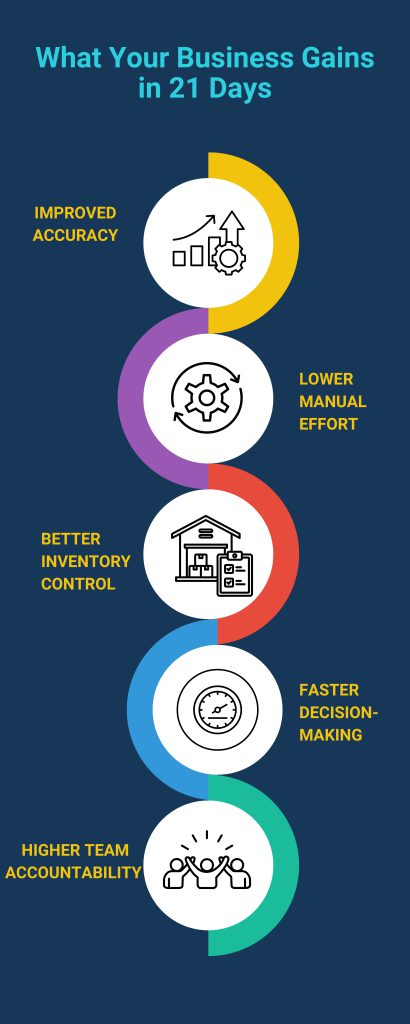
A structured 21-day ERPNext implementation delivers improvements you can measure almost immediately. By focusing on the core modules first, your business begins to benefit long before the advanced features are introduced.
Improved Accuracy
Data becomes centralized, consistent, and reliable.
Manual entries, spreadsheet conflicts, and duplicated records disappear.
Your team works with accurate information every day, reducing operational mistakes.
Lower Manual Effort
Routine tasks that once required follow-ups now run automatically.
Stock updates, invoice reminders, and approval flows operate without constant supervision.
This reduces workload and frees up time for higher-value activities.
Better Inventory Control
Your stock becomes structured, traceable, and always up to date.
Problems like overstocking, shortages, and mismatches are eliminated.
You gain full visibility across warehouses, enabling smarter purchasing decisions.
Faster Decision-Making
Real-time dashboards update sales, expenses, and stock levels instantly.
Leadership no longer waits for end-of-month reports to understand performance.
Decisions become faster and more accurate because they are backed by live data.
Higher Team Accountability
Every action is logged with timestamps and user details.
This creates transparency across departments and improves process discipline.
Teams understand their responsibilities clearly, strengthening overall operational control.
Implementation Approach
We follow a fixed-scope, milestone-based rollout designed specifically for SMEs. Each phase is time-bound and results-driven, ensuring your team sees real progress every week. Deployments are led by experienced ERPNext specialists who have implemented systems for trading, manufacturing, services, retail, and distribution companies across multiple countries.
What’s Included
• Full configuration and setup
• Data migration support
• Team training
• Go-live support
• Post-launch assistance
6. Final Thoughts
A structured 21-day implementation takes the uncertainty out of ERP projects. Instead of long, complicated rollouts, your business gets a stable, fully functional system in just three weeks. With the right guidance, even small teams can adopt automation, improve operational clarity, and work with clean, reliable data, without slowing down day-to-day activities.
ERPNext gives SMEs a complete operational backbone without recurring license fees. You gain accuracy, transparency, and scalability from a system designed to grow with your business.
If you want expert support in deploying ERPNext correctly and efficiently, you can explore the full implementation details here:
https://gnosysdigital.com/erpnext-implementation/
