
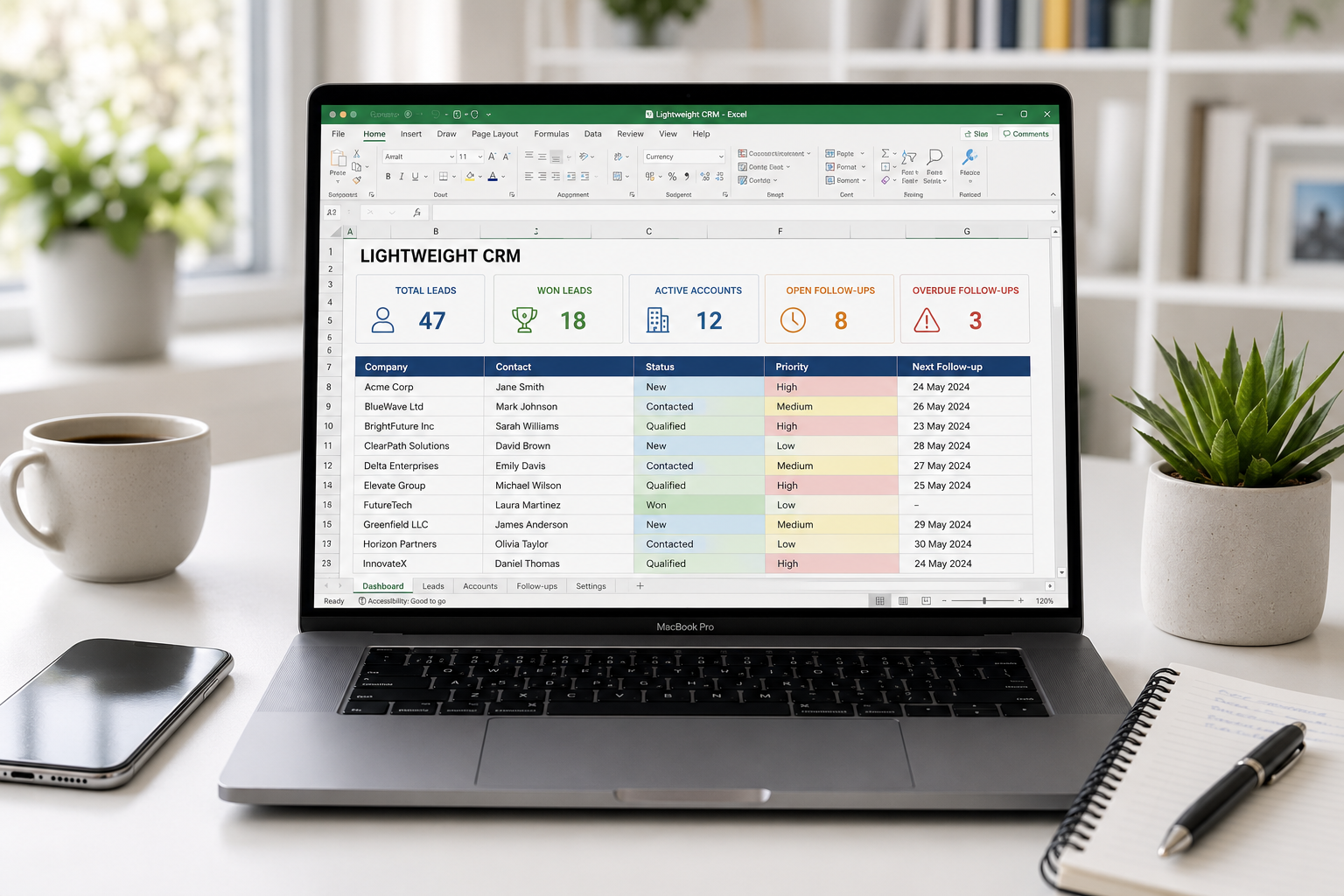
Description
The Simple CRM That Helps You Close More Deals
You have leads. You have follow-ups. You have clients. But do you have a system?
Are you still tracking prospects in a messy spreadsheet? Losing follow-ups in your inbox? Forgetting to chase renewals? Missing opportunities because you don’t have a clear view of your pipeline?
TheLightweight CRM is a comprehensive, ready-to-use Excel template that gives you a complete customer relationship management system—without the monthly subscription fees. Track your leads, schedule follow-ups, manage accounts, and never miss a renewal again. All in one file. All without the complexity of expensive SaaS tools.
Why You Need This Template
- Stop Losing Leads – Every prospect is tracked from first contact to “Won” or “Lost.” No more falling through the cracks.
- Never Miss a Follow-up – The follow-up scheduler shows you exactly what needs to happen today. Open follow-ups and overdue tasks are clearly highlighted.
- Track Your Pipeline at a Glance – The dashboard shows your total leads, open leads, won leads, active accounts, and overdue follow-ups. One glance = complete visibility.
- Never Miss a Renewal – The closure reminders sheet tracks every account renewal, subscription expiry, and check-in date with automated days-remaining countdowns.
- Save $30+ Per Month – No subscription fees. No hidden costs. One-time purchase, use it forever.
- Complete Customer History – Every interaction, follow-up, and decision is logged in one place.
What’s Inside the Template
This spreadsheet is organized into seven powerful, interconnected sheets:
- Dashboard Your CRM command center with pipeline snapshot:
- Total Leads, Open Leads, Won Leads
- Lead Status Breakdown: New, Contacted, Qualified, Proposal Sent, Negotiation, Won, Lost, On Hold
- Open Follow-ups & Overdue Follow-ups
- Active Accounts & Renewals ≤30 Days
- One glance = Complete visibility of your business
- Leads Track every prospect from first contact to close:
- Lead ID, Created Date, Company, Contact Name, Email, Phone
- Source, Service Interest, Estimated Value
- Status (New, Contacted, Qualified, Proposal Sent, Negotiation, Won, Lost, On Hold)
- Priority (High, Medium, Low), Owner, Last Contact
- Automated: Next Follow-up Date, Days to Follow-up
- Notes for context
- Accounts Manage your won leads as active accounts:
- Account ID, Company, Primary Contact, Email, Phone
- Service/Plan, Account Value, Start Date, Renewal Date
- Status (Active, At Risk, Inactive, Closed)
- Owner, Last Check-in, Next Check-in
- Automated: Days to Check-in countdown
- Notes for context
- Follow-ups & Activities Schedule and track every sales activity:
- Task ID, Due Date, Related Type (Lead or Account), Related ID
- Company/Lead, Task Type (Call, Email, Meeting, Proposal, Demo, Other)
- Subject, Owner, Priority
- Status (Open, Completed, Deferred)
- Completed Date & Notes
- Automated: Overdue tracking
- Account Closure & Renewal Reminders Never miss a renewal again:
- Reminder ID, Account ID, Company
- Reminder Type (Contract Renewal, Account Closure, Payment Follow-up, Document Expiry, Check-in)
- Trigger Date, Reminder Date
- Automated: Days Remaining countdown (positive = days until due, negative = overdue)
- Owner, Status, Action Required, Completed Date
- Escalation notes
- Lists Dropdown menus for consistent data entry:
- Lead Source, Lead Status, Priority, Account Status
- Task Type, Task Status, Closure Type, Owner
- Maintains data integrity across all sheets
How It Works
Step 1: Add prospects in Leads
Step 2: Schedule every next action in Follow-ups
Step 3: Convert won leads into Accounts
Step 4: Add renewal/closure dates in Closure Reminders
The dashboard updates automatically. No manual calculations needed.
Who Is This Template For?
- Freelancers who need to track multiple leads and clients
- Consultants who want a simple way to manage their sales pipeline
- Small Agencies (2-10 people) that need a lightweight CRM without the cost
- Solopreneurs who want to stay on top of follow-ups and renewals
- Service Providers in any industry (marketing, design, development, consulting, coaching)
Features at a Glance
- 📊Dashboard – Pipeline snapshot with 10 key metrics
- 📝Leads – Track 200 leads with status, priority, and follow-ups
- 🏢Accounts – Manage 200 accounts with renewal tracking
- ⏰Follow-ups – Schedule 200 tasks with due dates and status
- 🔔Closure Reminders – Never miss a renewal (200 reminders)
- 📋Lists – Dropdown menus for consistent data entry
- 📈Lead Status Breakdown – New, Contacted, Qualified, Proposal Sent, Negotiation, Won, Lost, On Hold
- 🔄Automated Countdowns – Days to follow-up, days to check-in, days remaining
- 🔄Fully Customizable – Add rows, modify dropdowns, fit your workflow
- 📄Google Sheets Compatible – Upload and use it with full functionality
- 📥Instant Download – Get the file immediately after purchase
- 🔒No Subscriptions – One-time purchase, use it forever
- 💰Cost Savings – Replaces expensive SaaS CRMs ($30+/month)
What You Will Receive
- 1 x Lightweight_CRM.xlsx – Fully functional Excel template with:
- Dashboard with pipeline snapshot
- Leads (200 leads)
- Accounts (200 accounts)
- Follow-ups & Activities (200 tasks)
- Closure & Renewal Reminders (200 reminders)
- Lists for dropdown consistency
- Instant digital download available immediately after purchase
Frequently Asked Questions
Q: Do I need to be a CRM expert to use this?
A: No. The template is designed to be intuitive. Just follow the 4-step workflow on the Dashboard, and you’ll be up and running in minutes.
Q: How many leads, accounts, follow-ups, and reminders can I track?
A: The template supports 200 leads, 200 accounts, 200 follow-up tasks, and 200 closure reminders. You can easily add more rows if needed.
Q: What is the difference between Leads and Accounts?
A: Leads are prospects you are actively selling to. Once a lead is marked as “Won,” you can convert it into an Account. Accounts are your active clients with ongoing services, renewals, and check-ins.
Q: How do the Closure Reminders work?
A: Each account has a Renewal Date or Check-in Date. The Closure Reminders sheet tracks these dates and shows you exactly how many days remain until the next renewal. When days remaining reaches 0 or below, you know it’s time to act.
Q: Can I use this for multiple businesses or clients?
A: The Personal License is for use with a single business. If you are an agency or consultant managing multiple clients, please purchase the Agency License.
Q: How do I track a lead from first contact to close?
A: In the Leads sheet, you change the Status field as the lead progresses: New → Contacted → Qualified → Proposal Sent → Negotiation → Won (or Lost). The dashboard updates automatically.
Q: What if I have more than one person using the CRM?
A: Yes. The template supports multiple team members. Simply add them to the Owner dropdown list in the Lists sheet.
Q: Does this work with Google Sheets?
A: Yes. You can easily upload and use this template in Google Sheets with full functionality. All formulas are compatible.
Q: Can I customize the dropdown lists?
A: Absolutely. The Lists sheet contains all dropdown options. Add, remove, or modify them to fit your workflow.
Q: Is this a subscription?
A: No. This is a one-time purchase. You download the file and own it forever with no recurring fees.
Q: What version of Excel do I need?
A: The template works with Excel 2016, 2019, Office 365, and newer versions. It is also fully compatible with Google Sheets.
Q: What if I need help setting it up?
A: The template includes clear instructions on the Dashboard. All input fields are clearly marked, and the formulas are automated. If you have any questions, I am available for support regarding the template’s functionality.
Bonuses Included
🎁Free Bonus 1: Automated Dashboard Pipeline snapshot updates automatically as you add leads, follow-ups, and accounts. No manual calculations needed.
🎁Free Bonus 2: Closure & Renewal Reminders Automated countdown to every renewal, subscription expiry, and check-in date. Never miss a renewal again.
🎁Free Bonus 3: Complete Sales History Every lead, follow-up, and account interaction is logged in one place. Complete audit trail for every customer.
Reviews
There are no reviews yet.