
The Situation
Two Applications, One Critical Problem
Painteye and Exotic were production web applications serving real customers with active data. Both were deployed on Vercel with Supabase PostgreSQL databases. When the projects were handed over for maintenance and migration, the development team faced an impossible situation the applications simply could not run.
The source code repositories were incomplete. Critical environment variables containing database credentials, API keys, and authentication secrets were missing. Without these values, the applications failed during startup. The production databases were inaccessible. No one could test anything, understand the full system behavior, or even verify if the code would work.
Adding to the complexity, both applications had been running in production for months. The databases contained:
- Administrator accounts and permissions
- Customer records and purchase history
- Warranty information and approval status
- Dealer registrations and partnerships
- Customer inquiries and lead data
Any mistake during recovery could permanently destroy real customer data.
The Hidden Obstacles
Painteye’s Authentication Block: Even after the database was restored, Painteye presented a puzzling issue. An administrator existed in the database, but login attempts consistently failed. The authentication logic was still referencing old administrator records that no longer existed, creating an invisible barrier to system access.
Exotic’s Connectivity Crisis: Exotic couldn’t connect to its Supabase database at all. The issue traced back to PostgreSQL connection ports and IPv4 configuration a technical hurdle that prevented the application from communicating with its own data.
The Missing Admin Registration: Neither application had an Admin Registration page. This wasn’t a bug it was by design. But it created a practical nightmare: how do you test an administrative system when you can’t create an admin account?
The Serverless Function Trap: Exotic relied heavily on Vercel Serverless Functions for critical business logic—contact form processing, warranty approvals, and email services. These functions were designed to run only in Vercel’s ecosystem. They would not execute on a standard Linux server, meaning the entire application would break when moved.
The Root Cause: Why Cheap Development Costs More
The state of the Painteye and Exotic codebases wasn’t accidental. It was the predictable outcome of prioritising cost over quality a classic example of the Developer’s Triangle in action.
The original development team had delivered two “working” production applications. But beneath the surface, the foundations were crumbling:
| What Was “Cheap” | The Real Cost |
|---|---|
| No environment variables documented | Hours wasted reconstructing configuration; applications completely un-runnable |
| No database credentials shared | Production data inaccessible; entire system locked out |
| Incomplete source code | Inability to understand or extend the system |
| Vendor-locked serverless functions | Complete re-architecture required for migration |
| No admin registration page | No way to test or manage the system without manual database intervention |
| No documentation or handover | Business continuity risk; dependency on unavailable original developer |
The Lesson
Choosing a developer based primarily on price is not a cost-saving measure it’s a risk transfer. You’re not avoiding expense; you’re deferring it to a later date, with interest.
The PaintEye and Exotic projects were not isolated cases. They represent a pattern we see repeatedly: applications built on tight budgets with minimal quality standards that become liabilities the moment they need to change, scale, or move.
When you hire cheap developers, you are not saving money. You are creating future problems that will cost far more to fix.
The Approach
Phase 1: Database Recovery
The Project Coordinator contacted the original developer to obtain SQL database export files for both applications. Instead of creating fresh databases, the team made a strategic decision: restore exactly what was running in production.
- New Supabase projects were created for each application
- SQL dump files were imported using the SQL Editor
- Complete production data was restored
- Every table was verified for completeness
- Data relationships were confirmed intact
Result: Full production data available for testing without any loss.
Phase 2: Breaking the Access Barrier
With databases restored but no admin access, the team needed to create a way in.
Manual Admin Creation: Since no registration page existed, a new administrator account was manually inserted directly into the database. The administrator record was carefully linked with all dependent tables to ensure complete system functionality. This allowed comprehensive testing to begin.
Environment Variable Generation: All required configuration values were generated and configured:
- DATABASE_URL for database connectivity
- NEXTAUTH_SECRET for authentication
- CRON_SECRET for scheduled tasks
- Supabase public and anonymous keys
- Resend API Key for email services
- Google API credentials for Sheets integration
With these in place, dependencies were installed, database connections were established, and the applications started locally for the first time.
Phase 3: Fixing the Broken Pieces
Painteye Authentication Fix: The authentication failure was diagnosed by debugging Prisma queries. The issue was clear: the authentication logic was still pointing to old administrator records. Prisma queries were updated to reference the newly created administrator account. Login succeeded, the dashboard loaded, and protected APIs worked correctly.
Exotic Database Connectivity Fix: The connection issue was resolved by replacing the standard connection string with the Supabase Session Pooler connection string. This adjustment addressed the port and IPv4 configuration problems, restoring database connectivity instantly.
Google Sheets Integration: While reviewing the Exotic codebase, the team discovered that Contact Us submissions were stored in Google Sheets. The required credentials were identified:
- Google API Key
- Client Secret
- Spreadsheet URL
After configuration, form submissions began storing data successfully in the spreadsheet.
Email Integration: Both applications used Resend for email delivery. Whenever an administrator approved a warranty, the customer automatically received a warranty card via email. The Resend API was configured locally and tested successfully. Production email delivery was prepared pending domain verification.
Phase 4: Serverless Function Modernization
The most significant architectural challenge was Exotic’s dependence on Vercel Serverless Functions. These functions could not run on a standard Linux server, requiring a complete re-architecture.
The Migration Process:
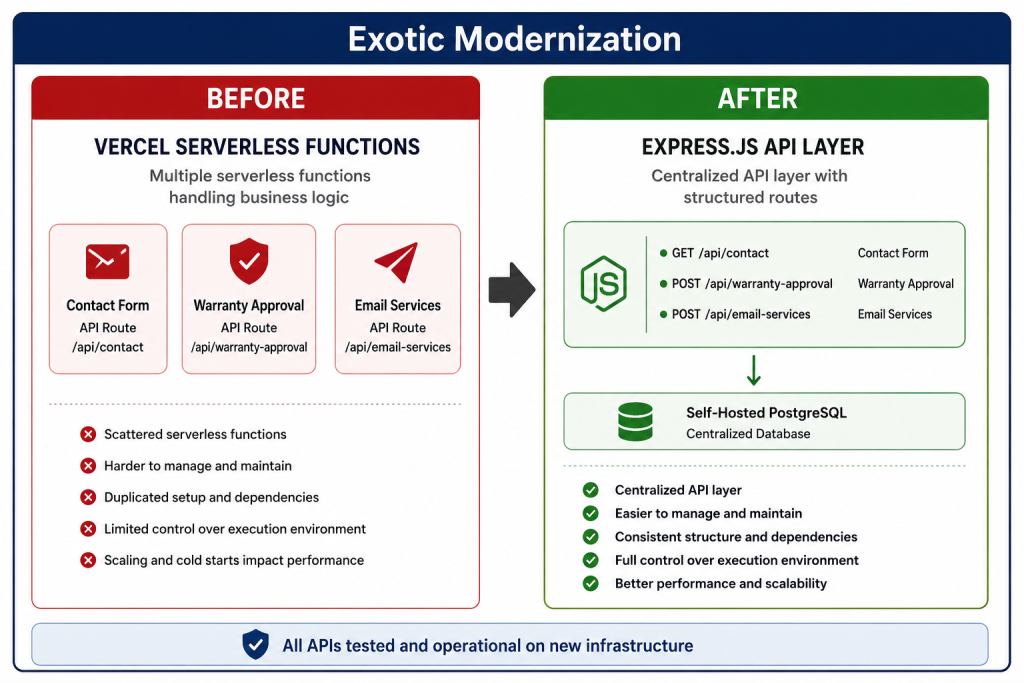
The Business Logic That Was Re-Architected:
| Original Function | New Implementation | Success Criteria |
|---|---|---|
| Contact Form Handler | Express.js API Endpoint | Form submissions stored in Google Sheets |
| Warranty Approval | Express.js API Endpoint | Database updated; email triggered |
| Email Services | Express.js API Endpoint | Warranty cards delivered to customers |
Result: All migrated APIs worked successfully on the new server without any Vercel dependency.
Phase 5: Production Deployment and Bug Resolution
Deployment Execution: After successful local testing, the deployment process included:
- Compressing project files for transfer
- Uploading source code to the new server
- Extracting and configuring files
- Setting up environment variables
- Installing dependencies
- Building production versions
- Starting production servers
The Production Bug After migration, Painteye worked correctly, but Exotic showed a concerning issue: warranty approvals updated the database successfully, but changes weren’t reflected in the UI. The bug was reproduced locally, diagnosed as a DOMPurify implementation issue, fixed, and redeployed to production.
Phase 6: Comprehensive Validation
Testing was performed after every migration stage:
| Module | Tests Performed | Status |
|---|---|---|
| Client Operations | Login, warranty registration, contact forms, inquiry forms | ✅ Passed |
| Admin Operations | Authentication, dashboard, warranty approval, user management | ✅ Passed |
| Database | Insert, update, delete operations and relationships | ✅ Passed |
| Warranty approval emails, Resend integration | ✅ Passed | |
| Deployment | Production build, domain access, SSL, API responses | ✅ Passed |
The Results
What Was Achieved
| Deliverable | Outcome |
|---|---|
| Production Databases | ✅ Restored with zero data loss |
| Local Development Environment | ✅ Configured and operational |
| Painteye Authentication | ✅ Fixed and working |
| Exotic Database Connectivity | ✅ Resolved |
| Google Sheets Integration | ✅ Fully configured |
| Email Services | ✅ Operational (production pending domain verification) |
| Serverless Functions | ✅ All re-architected as Express.js APIs |
| Both Applications | ✅ Deployed to new infrastructure |
| Production Bug | ✅ Identified and fixed |
| Production Testing | ✅ Completed with all tests passing |
Critical Success Metrics
- Zero Production Data Loss — All customer, warranty, dealer, and inquiry data preserved
- 100% Application Recovery — Both applications restored and operational
- Complete Serverless Modernization — All Vercel functions replaced with infrastructure-agnostic APIs
- Full Testing Coverage — Every module verified across client, admin, database, email, and deployment layers
Skills Applied
| Category | Technologies |
|---|---|
| Frontend | Next.js, React, Vite |
| Backend | Node.js, Express.js |
| Database | PostgreSQL, Supabase, Prisma ORM |
| APIs | Google Sheets API, Resend Email API |
| Infrastructure | Linux Server Administration, Vercel Deployment |
| Security | SSL Configuration, DNS Configuration |
| Development | Production Debugging, Database Migration |
What We Learned
This project provided deep practical experience in:
Recovering from Incomplete Code Production applications often arrive with missing configuration and incomplete documentation. The ability to reconstruct environment variables, restore databases, and piece together working systems is a critical skill.
Safe Database Migration When production data is at stake, there is no room for error. Every step must be verified, every relationship confirmed, and every record accounted for before cutting over.
Legacy Modernization Vendor-specific serverless functions represent a migration trap. Re-architecting them as infrastructure-agnostic APIs is essential for long-term flexibility.
Authentication Troubleshooting Authentication failures often hide in plain sight—outdated queries, mismatched references, and assumptions about data that no longer exist.
Zero-Data-Loss Strategies The most important outcome is preserving production data. All migration decisions should prioritize data safety above all else.
Client Feedback
“Gnosys Digital recovered two production applications that we thought might need to be rebuilt from scratch. They restored our databases, fixed critical issues, and modernized the architecture all with zero data loss. Their systematic approach and technical expertise turned a potential crisis into a successful migration.”
About Gnosys Digital
Gnosys Digital specializes in application recovery, modernization, and migration. We help organizations rescue stranded codebases, restore production data, and modernize legacy architectures for the cloud era.
Contact Us gnosysdigital.com
Ready to recover, modernize, or migrate your applications? Let’s talk.
