
Description
The Complete Agency Operations System – From Intake to Profit Analysis
Are you drowning in spreadsheets, sticky notes, and disconnected tools? Struggling to track billable hours, monitor project profitability, or keep client communication organized? Spending more time managing projects than delivering them?
TheAgency Project Management Suite is a comprehensive, ready-to-use Excel template that gives you everything you need to run your agency or freelance business. One file. Six interconnected sheets. Complete visibility into your projects, tasks, time, budget, and client relationships.
Why You Need This Template
- Stop Tool Sprawl – No more switching between project management apps, time trackers, and spreadsheets. Everything is in one place.
- Track Profitability in Real-Time – The Budget vs Actual sheet automatically compares agreed budgets against logged hours. Know instantly if a project is on track or losing money.
- Log Time Efficiently – The hour tracker connects to your tasks and projects. Billable hours feed directly into your budget comparison.
- Never Miss a Client Communication – Every email, call, and meeting is logged in one place. No more digging through inboxes to find decisions.
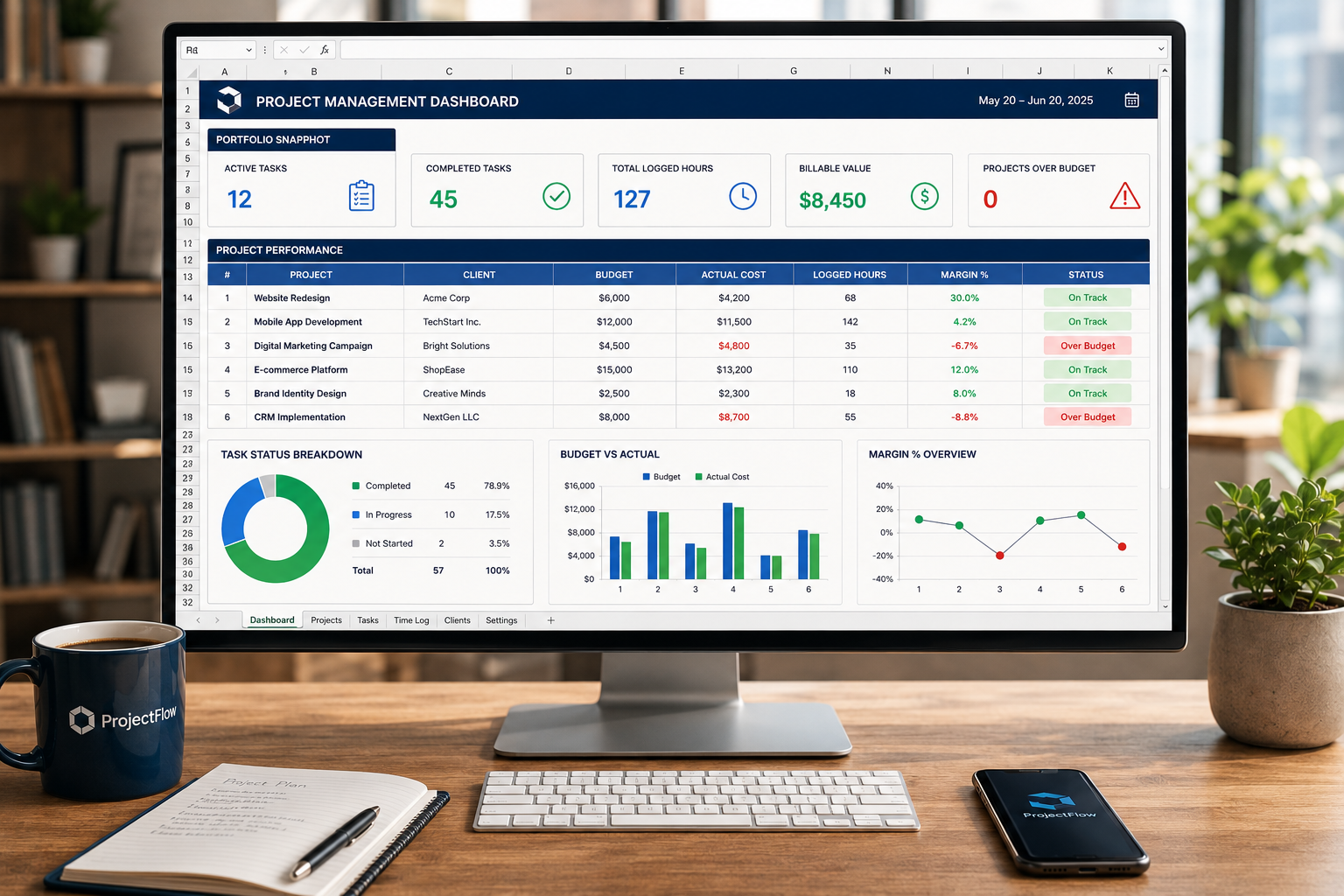
- Get a Portfolio Snapshot – The dashboard shows active tasks, completed tasks, total hours, billable value, and projects over budget at a glance.
- Save Hours Every Week – Everything you need in one template. No more context switching.
What’s Inside the Template
This spreadsheet is organized into seven powerful, interconnected sheets:
- Dashboard Your agency command center with portfolio snapshot:
- Active Tasks, Completed Tasks, Total Logged Hours
- Billable Value, Projects Over Budget
- One glance = Complete visibility
- Project Intake Form Capture every new project consistently:
- Project ID, Name, Client, Contact
- Project Manager, Start Date, Target Completion
- Project Budget, Estimated Hours
- Scope/Deliverables, Key Notes/Risks
- Professional project setup in minutes
- Task List Track project delivery, responsibilities, deadlines, and progress:
- Task ID, Project ID, Task/Deliverable, Owner
- Start Date, Due Date, Status, Priority
- Est. Hours, Actual Hours, Notes
- 100 tasks capacity – scalable for growing agencies
- Hour Tracker Log time by task; billable hours feed the budget comparison automatically:
- Entry ID, Date, Project ID, Task ID, Team Member
- Hours, Billable?, Hourly Rate, Billable Value, Description
- 200 entries capacity – comprehensive time tracking
- Budget vs Actual Compare agreed project budget with logged labour and other delivery costs:
- Project ID, Name, Client, Agreed Budget
- Estimated Hours, Actual Hours, Labour Cost
- Other Costs, Total Actual Cost, Budget Remaining, Margin %
- Real-time profitability monitoring
- Client Communication Log Keep emails, calls, meetings, decisions, and follow-ups in one project record:
- Log ID, Date, Project ID, Client/Contact
- Type (Email, Call, Meeting, WhatsApp, Note)
- Direction (Inbound, Outbound, Internal)
- Summary/Discussion, Decision/Outcome
- Follow-up Action, Follow-up Due, Owner, Status
- 150 entries capacity – complete communication history
- Lists Dropdown menus for consistent data entry:
- Status, Priority, Task Owner, Project Status
- Communication Type, Communication Direction
- Billable, Expense Type
- Maintains data integrity across all sheets
How It Works
Step 1: Add a project in Project Intake
Step 2: Create tasks and assign owners in Task List
Step 3: Log time in Hour Tracker
Step 4: Add one row per project in Budget vs Actual
Step 5: Record every client touchpoint in Client Communication Log
The dashboard updates automatically. No manual calculations needed.
Who Is This Template For?
- Freelancers who need to track multiple clients and projects
- Small Agencies (2-10 people) that need a lightweight project management system
- Consultants who bill by the hour and need accurate time tracking
- Project Managers who want to monitor budgets and profitability
- Creative Studios that need to track project costs and client communication
- Web Developers & Designers who need to log billable hours accurately
Features at a Glance
- 📊Dashboard – Portfolio snapshot with 5 key metrics
- 📝Project Intake – Consistent project setup every time
- ✅Task List – Track 100 tasks with status and priority
- ⏱️Hour Tracker – Log 200 time entries with billable value
- 💰Budget vs Actual – Real-time profitability monitoring
- 💬Client Communication Log – 150 communication entries
- 📋Lists – Dropdown menus for consistent data entry
- 🔗Fully Interconnected – Sheets talk to each other automatically
- 🔄Fully Customizable – Add rows, modify dropdowns, fit your workflow
- 📄Google Sheets Compatible – Upload and use it with full functionality
- 📥Instant Download – Get the file immediately after purchase
- 🔒No Subscriptions – One-time purchase, use it forever
What You Will Receive
- 1 x Agency_Project_Management_Suite.xlsx – Fully functional Excel template with:
- Dashboard with portfolio snapshot
- Project Intake Form
- Task List (100 tasks)
- Hour Tracker (200 entries)
- Budget vs Actual (30 projects)
- Client Communication Log (150 entries)
- Lists for dropdown consistency
- Instant digital download available immediately after purchase
Frequently Asked Questions
Q: Do I need to be a project management expert to use this?
A: No. The template is designed to be intuitive. Just follow the 5-step workflow on the Dashboard, and you’ll be up and running in minutes.
Q: How many projects can I track?
A: The Budget vs Actual sheet supports up to 30 projects. You can easily add more rows if needed.
Q: Can multiple team members use this?
A: Yes. The template supports multiple team members. Simply add them to the Task Owner dropdown list in the Lists sheet, and they can log time and update tasks.
Q: How does the Budget vs Actual sheet work?
A: The Labour Cost and Actual Hours columns pull data automatically from the Hour Tracker based on the Project ID. You enter the Other Costs manually. The sheet then calculates Total Actual Cost, Budget Remaining, and Margin %. If Budget Remaining is negative, the project is over budget.
Q: Can I track non-billable time?
A: Yes. The Hour Tracker has a Billable? column. Set it to “No” for internal work, admin, or non-billable tasks.
Q: Does this work with Google Sheets?
A: Yes. You can easily upload and use this template in Google Sheets with full functionality. All formulas are compatible.
Q: Can I customize the dropdown lists?
A: Absolutely. The Lists sheet contains all dropdown options. Add, remove, or modify them to fit your workflow.
Q: Can I use this for multiple clients?
A: The Personal License is for use with a single business. If you are an agency or consultant managing multiple clients, please purchase the Agency License.
Q: Is this a subscription?
A: No. This is a one-time purchase. You download the file and own it forever with no recurring fees.
Q: What version of Excel do I need?
A: The template works with Excel 2016, 2019, Office 365, and newer versions. It is also fully compatible with Google Sheets.
Q: What if I need help setting it up?
A: The template includes clear instructions on the Dashboard. All input fields are clearly marked, and the formulas are automated. If you have any questions, I am available for support regarding the template’s functionality.
Bonuses Included
🎁Free Bonus 1: Automated Dashboard A portfolio snapshot that updates automatically. Active tasks, completed tasks, total hours, billable value, and projects over budget—all at a glance.
🎁Free Bonus 2: Interconnected Sheets The Hour Tracker and Budget vs Actual sheets talk to each other automatically. No manual data entry for labour costs.
🎁Free Bonus 3: Client Communication Log Every email, call, meeting, and decision in one place. Never lose important client context again.
Reviews
There are no reviews yet.