
Description
The All-in-One Content Marketing System – From Idea to Repurposing
Are you drowning in content chaos? Posting inconsistently? Struggling to track what’s working? Or worse, spending hours creating content that disappears after one post?
TheContent Marketing Calendar & Planner is a comprehensive, ready-to-use Excel spreadsheet that gives you a complete content marketing system. Plan your content, generate social captions, track performance, and repurpose your best assets into 5–10 new pieces—all in one place. No more chaos. No more wasted effort. Just a proven workflow to create content that actually drives results.
Why You Need This Template
- Stop the Chaos – A single source of truth for all your content. No more scattered spreadsheets, notes, and lost ideas.
- Plan Like a Pro – Map your content to strategic pillars and topic clusters. Every piece has a purpose.
- Create Captions Faster – The built-in caption generator combines headlines, hooks, value statements, and CTAs into ready-to-use social captions.
- Maximize Every Asset – The repurposing engine shows you exactly how to turn one piece of content into 5–10 distribution-ready assets.
- Track What Works – The performance scorecard identifies your winners so you can repeat success.
- Save Hours Every Week – Everything you need in one template. No more context switching.
What’s Inside the Template
This spreadsheet is organized into six powerful, interconnected sheets:
- Cover Sheet A professional overview with what’s included, how to use the template, and the complete workflow:IDEA → DRAFTING → REVIEW → SCHEDULED → PUBLISHED → MEASURE → REPURPOSE
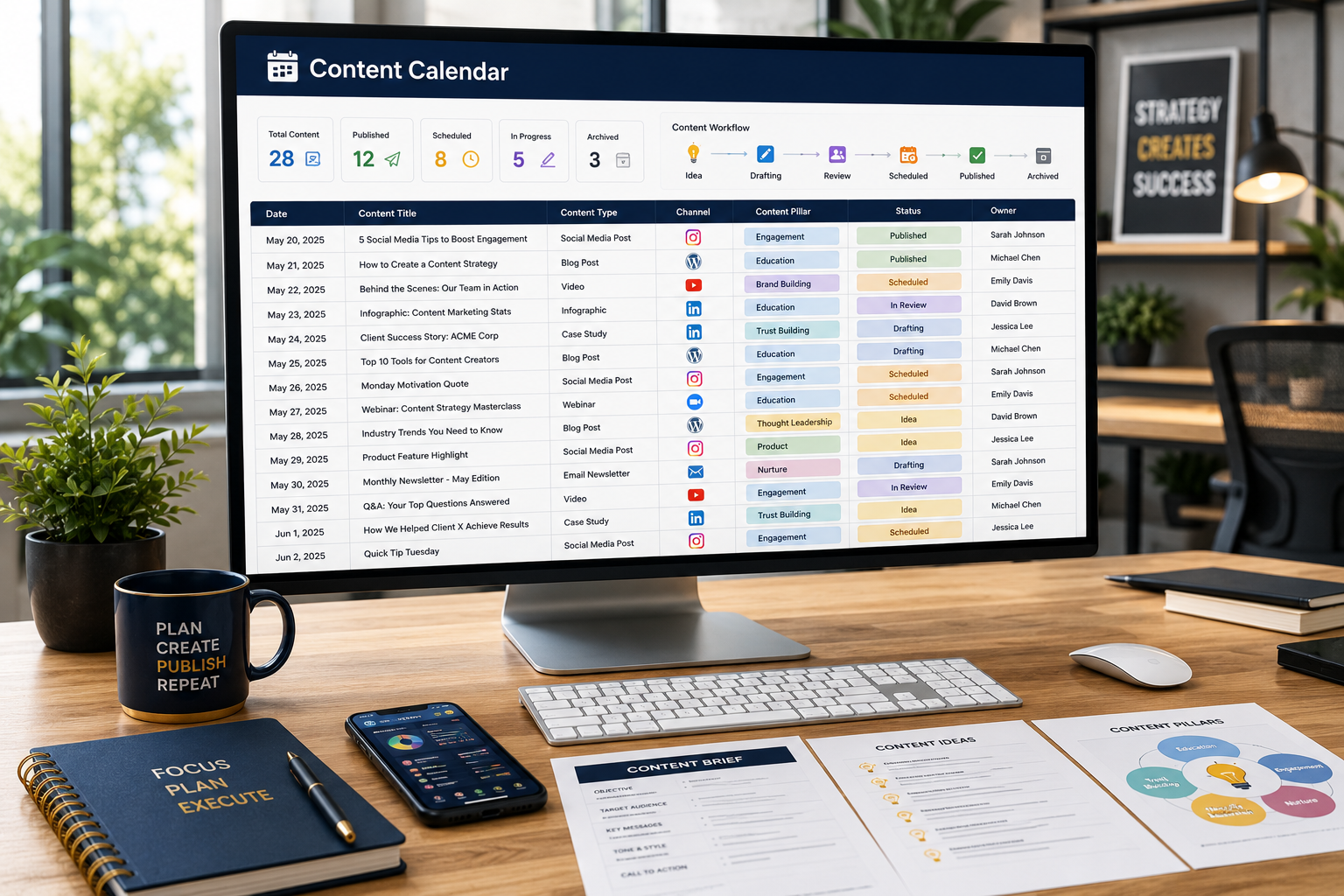
- Content Calendar Your master publishing calendar with:
- Publish Date, Content Title, Channel, Content Type
- Pillar & Topic Cluster mapping
- Owner, Status, Primary CTA, Notes
- Automatic totals: Total Planned and Published count
- Status tracking: Idea, Drafting, Review, Scheduled, Published, Archived
- Social Media Caption Generator Create professional captions from reusable building blocks:
- Headline – Grab attention
- Hook / Opening – Draw readers in
- Value Statement – Deliver the core message
- CTA – Tell them what to do next
- Hashtag Set – Improve discoverability
- Generated Caption – Automatically combines all elements into a ready-to-use caption
- Content Pillars & Topic Clusters Map strategic themes to content ideas:
- Content Pillar and Pillar Goal
- Topic Cluster and Audience Question/Keyword
- Format Ideas, Priority, and Status
- Perfect for: Building a content strategy that actually works
- Content Repurposing Engine Turn one cornerstone asset into 10 distribution-ready pieces:
- Source Content and Core Insight
- 10 Suggested Assets: LinkedIn carousel, Instagram Reel, X/Twitter thread, Newsletter section, Quote graphic, Short FAQ video, Infographic, Blog update, Podcast talking point, Sales enablement snippet
- Channel, Angle/Hook, Status, and Publish Date
- Your time-saver: Stop creating from scratch. Repurpose what works.
- Performance Scorecard Identify repeatable winners:
- Content Title, Channel, Publish Date
- Views/Reach, Engagements, Link Clicks, Conversions
- Automated Engagement Rate
- Performance Score (weighted formula: 50% engagement, 30% link clicks, 20% conversions)
- Learning / Next Action – What to do next
Who Is This Template For?
- Content Marketing Managers who need a centralized system to plan and track content
- Digital Marketing Agencies that manage content for multiple clients
- Freelance Content Creators who want to streamline their workflow
- Small Business Owners who create their own content
- SEO Specialists who need to map content to topic clusters
- Social Media Managers who need a calendar and caption generator
Features at a Glance
- 📅Master Content Calendar – Plan and track every piece of content
- ✍️Caption Generator – Build captions from reusable blocks
- 🎯Pillars & Clusters – Map content to strategic themes
- 🔄Repurposing Engine – Turn one asset into 10 pieces
- 📊Performance Scorecard – Identify repeatable winners
- 🚦Status Tracking – Idea → Drafting → Review → Scheduled → Published → Archived
- 🔗Channel Support – Blog, LinkedIn, Instagram, Facebook, Twitter/X, TikTok, YouTube, Newsletter
- 🔄Fully Customizable – Add or remove items to fit your needs
- 📄Google Sheets Compatible – Upload and use it with full functionality
- 📥Instant Download – Get the file immediately after purchase
- 🔒No Subscriptions – One-time purchase, use it forever
What You Will Receive
- 1 x Content_Marketing_Calendar_Planner.xlsx – Fully functional Excel template with:
- Cover sheet with instructions and workflow
- Master Content Calendar with status tracking
- Social Media Caption Generator
- Content Pillars & Topic Clusters
- Content Repurposing Engine (1 asset → 10 pieces)
- Performance Scorecard with automated scoring
- Instant digital download available immediately after purchase
Frequently Asked Questions
Q: Do I need to be a content marketing expert to use this?
A: No. The template is designed for beginners and experts alike. The workflow guides you from idea to repurposing, and each sheet includes clear instructions.
Q: Which channels does this support?
A: The template supports Blog, LinkedIn, Instagram, Facebook, Twitter/X, TikTok, YouTube, and Newsletter. You can also add custom channels.
Q: Can I use this for multiple clients?
A: The Personal License is for use with a single business. If you are an agency or consultant managing multiple clients, please purchase the Agency License.
Q: How does the Caption Generator work?
A: You enter a Headline, Hook, Value Statement, CTA, and Hashtag Set. The template automatically combines them into a formatted, ready-to-use caption. No more starting from scratch.
Q: What is the Content Repurposing Engine?
A: It’s a pre-built framework that shows you exactly how to turn one cornerstone asset (like a blog post) into 10 distribution-ready pieces across different channels. It saves you hours of planning and creative thinking.
Q: How is the Performance Score calculated?
A: The score uses a weighted formula: 50% Engagement Rate, 30% Link Clicks (relative to max), and 20% Conversions (relative to max). This helps you identify your best-performing content objectively.
Q: Does this work with Google Sheets?
A: Yes. You can easily upload and use this template in Google Sheets with full functionality. All formulas are compatible.
Q: Can I customize the template?
A: Absolutely. You can add or remove rows, modify the caption generator blocks, change the repurposing suggestions, and adjust the performance scorecard to fit your specific needs.
Q: Is this a subscription?
A: No. This is a one-time purchase. You download the file and own it forever with no recurring fees.
Q: What version of Excel do I need?
A: The template works with Excel 2016, 2019, Office 365, and newer versions. It is also fully compatible with Google Sheets.
Q: What if I need help setting it up?
A: The template includes clear instructions on the Cover sheet. All input fields are clearly marked, and the formulas are automated. If you have any questions, I am available for support regarding the template’s functionality.
🎁Free Bonus 1: Social Media Caption Generator Build professional captions from reusable building blocks. No more writer’s block.
🎁Free Bonus 2: Content Repurposing Engine Turn one cornerstone asset into 10 distribution-ready pieces. Get more mileage from every piece of content.
🎁Free Bonus 3: Automated Performance Scorecard Identify your repeatable winners with an automated scoring system that objectively ranks your content.
Reviews
There are no reviews yet.