
For many small and medium enterprises, implementing an ERP system feels like the right step toward growth. It promises automation, better visibility, and stronger control over daily operations. Yet a large number of SMEs either struggle during implementation or end up with a system that never delivers the value they expected.
Most ERP failures have little to do with the software. They usually stem from unclear planning, poor execution, or choosing an approach that doesn’t match the company’s needs. When goals, processes, and responsibilities aren’t aligned, the ERP becomes a burden instead of an advantage.
This guide breaks down the main reasons SMEs fail at ERP and the practical steps that help you avoid these challenges. With the right structure, preparation, and support, ERP implementation becomes a smooth, predictable journey that strengthens your entire business.
1. Lack of Clear Objectives
One of the biggest reasons SMEs fail at ERP implementation is the absence of clear, measurable objectives. Many businesses decide to adopt an ERP system because competitors are doing it or because it “seems like the next step.” This approach leads to confusion, unrealistic expectations, and wasted time.
Without defined goals, teams don’t understand what success looks like. As a result, every decision during implementation becomes reactive instead of strategic.
Typical warning signs include:
• No measurable targets linked to business performance
• No clarity on which processes will change or why
• Teams are unsure how the ERP supports their daily responsibilities
How to avoid this:
Before the implementation begins, outline three to five specific objectives that directly connect to your business needs. For example:
• Reduce inventory discrepancies by 50 percent
• Cut manual reporting work by 80 percent
• Improve order-to-delivery accuracy past 95 percent
Document these goals and share them with every department involved. When your objectives are clear, the ERP roadmap becomes focused, measurable, and easier to execute. Strong objectives keep teams aligned, reduce implementation errors, and ensure the ERP actually delivers value to the business.
2. Choosing the Wrong ERP System
Another major reason SMEs struggle with ERP implementation is selecting a system that simply doesn’t fit their business. Many companies get influenced by aggressive sales pitches or big-brand names and end up choosing an ERP that is too complex, too expensive, or not designed for their industry.
When the system isn’t aligned with real operational needs, teams face confusion, delays, and unnecessary costs.
Common problems include:
• High licensing fees that strain cash flow
• Rigid, pre-defined processes that don’t match actual workflows
• Heavy customization requirements to make the system usable
• Long implementation cycles that disrupt daily operations
How to avoid this:
Choose an ERP based on your business size, workflow structure, and budget—not popularity. Look for a system that offers flexibility, scalability, and clean integration without unnecessary complexity. Platforms like ERPNext are built with SMEs in mind, offering strong features without high licensing costs or forced operational changes.
Selecting the right ERP early ensures smoother implementation, faster adoption, and a better return on investment.
3. Weak Process Understanding
A major reason ERP projects fail is that many SMEs attempt to automate processes they have never fully understood or documented. When workflows are inconsistent, outdated, or different across departments, the ERP has no solid foundation to build on. Instead of improving efficiency, the system exposes more confusion and triggers resistance from the team.
When processes are unclear, the ERP cannot deliver accurate reports, smooth approvals, or predictable outcomes. It simply reflects the inconsistencies that already exist in the business.
Key warning signs include:
• No documented SOPs for core tasks
• Conflicting or incomplete data across departments
• Different teams performing the same workflow in different ways
How to avoid this:
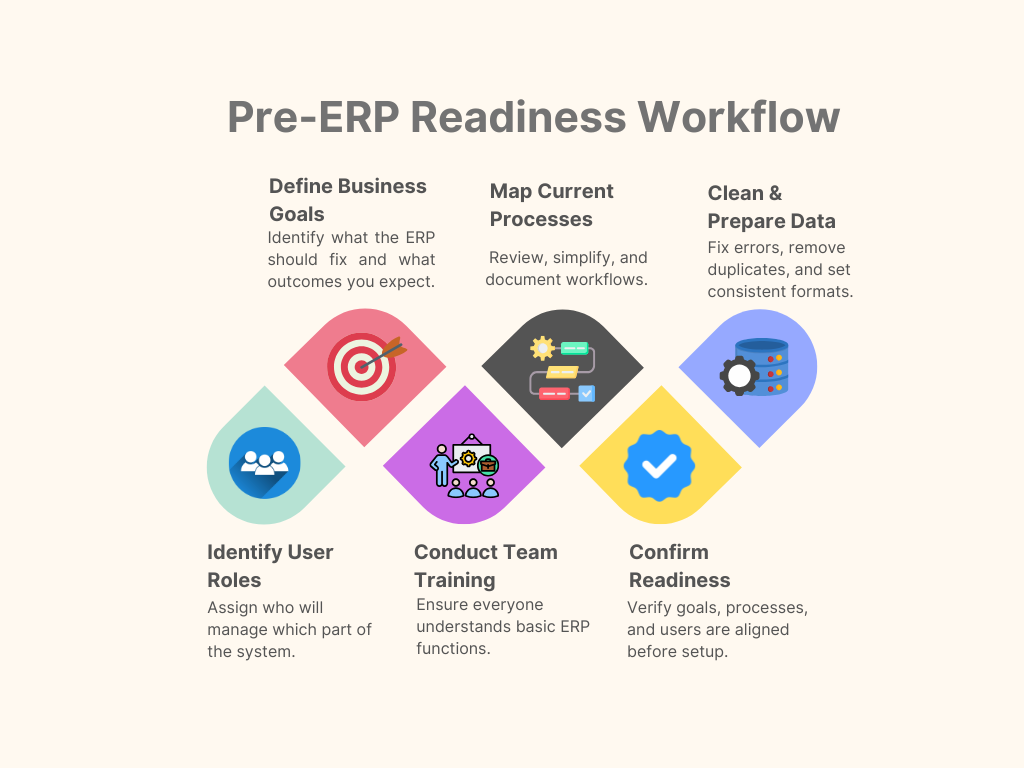
Before implementation begins, map your current processes end-to-end. Identify steps that are duplicated, outdated, or unnecessary. Resolve inconsistencies across departments and standardize the workflow. Once your operations are clean and structured, the ERP can run smoothly and deliver the accuracy and automation it is designed for.
4. Poor Change Management
ERP implementation is not only a technical project. It is a change in how people work every day. When teams are asked to move from manual, flexible routines to standardized and rule-based processes, resistance is natural. Without proper communication and support, this resistance becomes one of the biggest reasons ERP projects fail.
When employees don’t understand why the change is happening or how it benefits them, they hesitate to adopt the new system. This leads to mistakes, delays, and a drop in overall efficiency.
Typical problems include:
• Low user adoption because teams prefer old methods
• Incorrect data entry due to confusion or lack of training
• Delayed tasks as employees struggle to adapt
How to avoid this:
Start change management early. Explain the purpose of the ERP and how it will make daily work easier, faster, and more reliable. Offer simple training sessions, hands-on practice, and clear documentation. Encourage managers to guide their teams throughout the transition. When employees see real value in the new system, they support it instead of resisting it.
5. Incomplete or Dirty Data Migration
Data is the backbone of every ERP system. If the information entering the system is outdated, inconsistent, or incomplete, the ERP will generate inaccurate results from the very first day. Many SMEs overlook this step and move their old, unorganized data directly into the new system. This creates problems that disrupt operations and damage trust in the ERP.
Poor data quality leads to unreliable reports, incorrect stock values, and confusion across departments. Instead of helping the business run smoothly, the ERP ends up amplifying existing inaccuracies.
Common impacts include:
• Wrong inventory levels that lead to stockouts or overstocking
• Faulty or misleading reports
• Misaligned financial records and reconciliation issues
How to avoid this:
Prepare your data before migration. Review existing records, remove duplicates, update outdated entries, and correct errors. Decide which data should be kept, archived, or rebuilt. A clean, organized dataset ensures accurate reporting, smooth operations, and a reliable ERP experience from day one.
6. Over-Customization
Many SMEs fall into the trap of trying to force the ERP to match every small detail of their older manual processes. Instead of adapting to standardized, efficient workflows, they attempt to rebuild their old system within the new one. This leads to unnecessary customization, increased complexity, and long-term technical issues.
Excessive customization not only slows down the implementation but also makes the system harder to maintain and upgrade. What begins as a simple request often grows into large development changes that offer little real business value.
What usually happens:
• Delayed implementation due to constant modifications
• Higher development and maintenance costs
• Difficulty upgrading to newer versions without breaking features
How to avoid this:
Customize only when there is a clear, proven business need. Rely on default features and standard workflows whenever possible. Well-designed ERPs, including ERPNext, follow industry best practices. Trust these built-in processes; they are often more efficient than legacy methods. Keeping customizations minimal ensures faster implementation, easier upgrades, and a more stable system.
| Common ERP Pitfall | What Happens | How to Avoid It |
| Lack of Clear Objectives | Teams make reactive decisions, and confusion arises | Define measurable goals, share with all departments |
| Choosing the Wrong ERP System | Complex, expensive, slow adoption | Choose ERP based on size, needs, and budget |
| Weak Process Understanding | Inconsistent workflows, inaccurate reports | Map and standardize workflows before ERP |
| Over-Customization | High costs, slow rollout, hard upgrades | Customize only when necessary, use default features |
| Weak Vendor/Partner | Delays, poor implementation | Select SME-experienced, proven vendors |
| No Post-Go-Live Support | Users struggle, processes fail | Plan continuous support and regular reviews |
7. Weak Vendor or Implementation Partner
One of the most common reasons ERP projects fail is selecting the wrong implementation partner. A vendor without SME-specific experience or proper methodology can turn an otherwise smooth project into a costly, delayed, and frustrating process. Some vendors also push unnecessary features or customization to increase billing, which adds complexity without real business value.
You can identify a weak partner if they:
• Lack a deep understanding of your business operations
• Overpromise on timelines and delivery
• Avoid transparent communication throughout the project
• Cannot clearly explain workflows and how the ERP supports them
How to avoid this:
Choose a partner who has proven experience working with SMEs and ERP systems. Look for strong communication, a structured implementation approach, and a clear methodology. A reliable partner ensures the ERP project is completed on time, within budget, and delivers real operational improvements.
8. No Post-Go-Live Support
Many SMEs assume that once the ERP system goes live, the implementation is complete. In reality, the first 60 to 90 days after go-live are critical for the system’s long-term success. Without proper support during this period, even a well-implemented ERP can fail to deliver its full value.
When post-go-live support is lacking, teams struggle to adapt, processes break down, and reports become unreliable. Frustrated users often revert to old manual methods, undermining the benefits of the ERP entirely.
Common issues include:
• Users getting stuck and unsure how to perform tasks
• Breakdowns in processes due to unhandled errors
• Reports that are inaccurate or incomplete
• Teams returning to manual workflows
How to avoid this:
Plan for continuous support from day one. Establish clear channels for issue resolution, schedule regular check-ins or weekly reviews, and make minor adjustments as needed. Continuous monitoring and optimisation ensure that the ERP remains stable, effective, and fully aligned with your business operations.
How SMEs Can Succeed with ERP
Successful ERP implementation for SMEs is not a matter of luck. It requires careful planning, disciplined execution, and the right support. By focusing on preparation and structured steps, businesses can ensure their ERP delivers the intended benefits, automation, accuracy, and efficiency, without disruption.
Here is a practical, step-by-step approach that SMEs can follow:
1. Set Clear Goals
Define measurable objectives before starting the implementation. Know exactly what success looks like, whether it’s reducing inventory errors, speeding up reporting, or improving delivery accuracy. Clear goals keep the project focused and aligned with business priorities.
2. Map All Key Processes
Document your current workflows before automation. Identify inefficiencies, remove redundant steps, and standardize processes across all departments. A well-mapped workflow is the foundation for a smooth ERP implementation.
3. Select the Right ERP
Choose an ERP system that fits your company’s size, operational needs, and budget. Avoid overcomplicated or overly expensive solutions. Platforms like ERPNext provide flexibility, scalability, and cost-effectiveness ideal for SMEs.
4. Train Your Team
Ensure every user is confident and comfortable with the new system. Offer practical, hands-on training sessions, guides, and ongoing support to encourage adoption and reduce resistance.
5. Keep Data Clean
Accurate, consistent data is essential for ERP success. Clean, validated, and standardized data ensure reliable reports, smooth operations, and faster decision-making.
6. Avoid Unnecessary Customization
Rely on standard features wherever possible. Customize only when there is a clear business need. Minimal customization reduces complexity, lowers costs, and ensures easier upgrades in the future.
7. Work with a Reliable Implementation Partner
Select a partner who understands SME operations and has proven ERP experience. Strong communication, structured methodology, and business insight are far more valuable than just technical knowledge.
8. Review Performance Regularly
Track key performance indicators (KPIs) and refine workflows continuously. Regular performance reviews allow you to optimize processes, correct issues early, and fully realize the benefits of ERP.
Summary:
By following these structured steps, SMEs can avoid common pitfalls, maximize the value of their ERP system, and achieve a smooth, efficient, and cost-effective digital transformation.
Final Thoughts
ERP is more than just software; it is a transformation in how your business operates every day. SMEs often fail because they treat ERP as a quick fix or a one-time project. Success comes when ERP is approached as a structured journey, supported by clear goals, standardized processes, trained teams, and expert guidance.
With the right planning and execution, ERP becomes a powerful backbone for your business, delivering accuracy, efficiency, and long-term stability.
If you want to implement ERPNext the right way, professional guidance ensures a smooth rollout, correct setup, and measurable results from day one.
Take the Right Step Toward a Successful ERP Implementation
Implement ERPNext confidently, without delays, guesswork, or costly mistakes. Professional guidance ensures every stage of your implementation is smooth, from clean data migration to stable workflows and full team adoption.
Start your ERPNext implementation with expert support today:
https://gnosysdigital.com/product/erpnext-implementation/
